

 Loading...




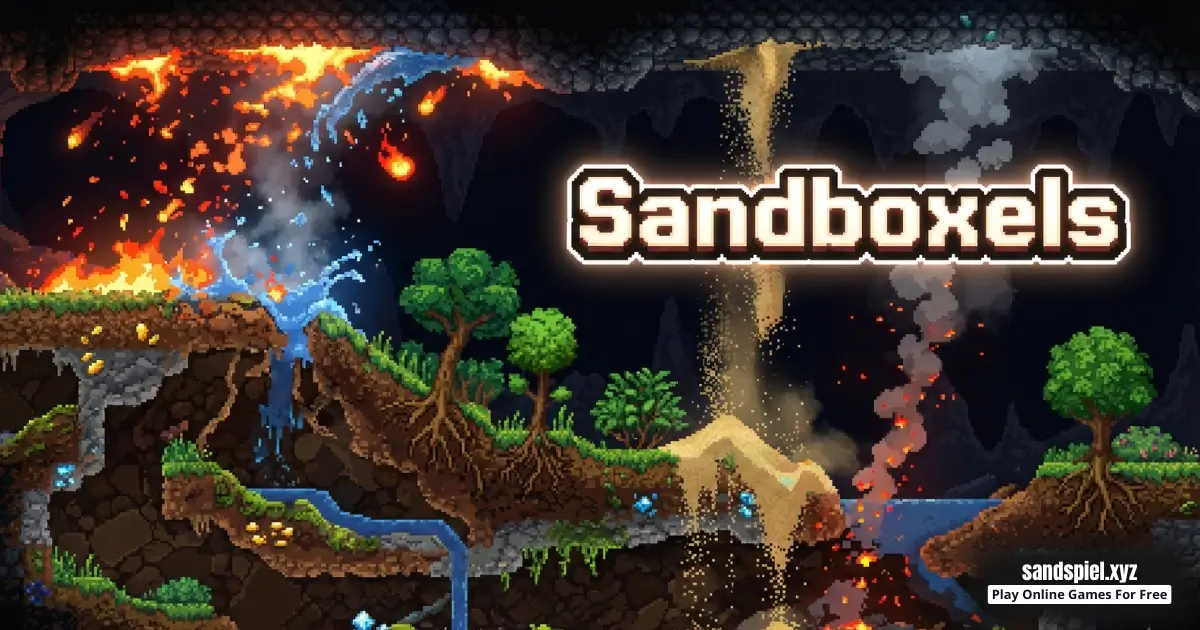
Play Sandboxels online for free and turn a blank screen into a tiny pixel science lab. Drop one Sandboxel, watch it fall, pile up, pour, or stay solid, then tweak your idea until it works. You can play right now as a browser game on sandspiel.xyz.
Sandboxels is a physics sandbox browser game, so there is no single correct path. Your goal can be calm building, funny chaos, or smart experiments that teach you patterns. Start small, learn what one material does, then expand your build when you understand it.
Whether you type Sandboxels or Sandboxel, the fun is the same: quick online play, simple controls, and endless experiments. If you want a safe, kid-friendly sandbox game you can open fast, this is a great pick.
What is Sandboxels?
Sandboxels is an online browser game in the physics sandbox genre. You place tiny blocky pixels into a 2D world and watch them follow simple rules like gravity, stacking, and flowing. Instead of levels with one answer, you create your own challenges and experiments.
Think of each Sandboxel as one tiny building block. Many Sandboxels together can become piles, walls, rivers, ramps, and simple machines. The fun comes from watching how the pixels behave and learning how to guide them with smart shapes.
Developer: Not officially confirmed from public sources for this browser version, so we do not guess names or dates.
Want to learn the genre name? See the Wikipedia page for sandbox-style games here: https://en.wikipedia.org/wiki/Sandbox_game.
If you like games where you build and test ideas, explore our Physics Sandbox Games category for more browser sandbox fun.
Sandboxels Gameplay
Sandboxels gameplay is all about observing cause and effect. You pick a material, place a small amount, watch what it does, and then adjust. Over time you go from guessing to predicting, and that feels awesome.
Most physics sandbox games include different behavior types:
- Powders: They fall and form piles and slopes.
- Liquids: They spread, flow, and fill empty spaces.
- Solids: They stay in place and can act like walls or floors.
A simple loop to follow is design, test, fix. Design a shape like a cup or funnel, test it with a moving material, then fix the weak spot you discover. Small edits teach you more than huge changes.
Try this first experiment: build a flat floor, then make a small hill using a powder material. Next, place a little liquid above the hill and watch how it flows. If it spills too far, add side walls and test again.
Placement speed matters. If you drop too much too fast, it becomes hard to learn. If you place slowly, you can spot the exact moment something changes, like the first leak or the first collapse.
When you get a result you like, clear and rebuild it from memory. This is a fast way to improve at Sandboxels, because you learn the steps that make Sandboxel builds work. For more ideas, browse our Physics Sandbox Games page.
Tip for learning faster: use pause (if available) to study what happened, then change only one thing. Also try changing brush size. A small brush is great for fixing corners, and a bigger brush is great for building walls quickly.
Beginner Builds to Try
If you are new to Sandboxels, these quick builds teach the basics fast. Do one build, clear, then try the next.
- The Cup: Make a U shape, then add a liquid. Fix leaks by thickening corners.
- The Dam: Build a wall, place liquid behind it, then create a small opening.
- The Funnel: Make two walls that narrow downward and see how powders gather.
- The Waterfall: Build a ledge and let liquid fall into a pool with side walls.
- The Maze: Create a simple wall maze and guide a moving material through it.
Tip: name your favorite build like a recipe, for example "double-wall cup" or "wide funnel." Naming builds helps you remake them later.
Sandboxels Levels, Modes, Characters, or Upgrades
Sandboxels is usually free play, not a character game with upgrades. Your progression is your creativity and your ability to control the physics. If you want structure, try these self-made modes:
- One-material mode: Build something cool using only one material.
- Two-material mode: Pick one builder and one mover, then design a clean scene.
- Clean-room mode: Keep your build tidy and away from the edges.
- Speed-run mode: Give yourself 60 seconds to make a container that holds.
- No-erase mode: Try to fix problems only by adding, not clearing.
If the game includes tools like brush size, pause, or clear, use them to test faster and learn patterns.
Platform
You can play Sandboxels as a browser game on desktop, laptop, tablet, or mobile. No install is required to start playing online. If your device feels small, keep your builds bigger and simpler so taps are easier. For smoother play, close extra tabs and run smaller experiments.
How to Play Sandboxels
- Goal: Place materials, watch how they move, and build shapes that guide that movement.
- Start with a small empty area so you can see everything clearly.
- Pick one material and place a tiny patch to learn its behavior.
- Add a second material only after you understand the first.
- Create shapes like floors, walls, ramps, cups, and funnels.
- Change one detail at a time, then watch what changed.
- Reset when needed and try again. In a sandbox, resetting is part of learning.
Your First 5 Minutes
- Open Sandboxels and find the material menu.
- Select a solid and draw a simple floor line.
- Select a powder and place a small pile on the floor. Watch it form a slope.
- Select a liquid and place a small amount above the pile. Watch it flow and settle.
- Add two side walls and repeat the liquid test. Notice how walls change the result.
Think like a detective. If your build fails, do not throw more material at it. Ask one question: did it fail because of the shape, the placement order, or the amount? Then retry with only one change so you can learn the rule behind the result.
Easy mission: build two rooms separated by a wall. Fill the left room with a moving material. Keep the right room empty. Make a tiny hole in the wall and see how fast the material escapes. Now change only the hole size and compare.
Helpful strategy: create two zones. Use the left side as a clean build zone where you work slowly, and the right side as a test zone where you try wild ideas. This keeps your best designs safe while you experiment.
Sandboxels Controls
- Desktop: Use your mouse to select materials from the menu, then click or click and drag to place them. On-screen buttons often handle clear, pause, and brush size.
- Mobile: Tap to select a material, then drag your finger to place it. Some versions have on-screen buttons for zoom, clear, or brush size.
Controls can vary slightly by device and version, but the idea stays the same: select, place, watch, adjust. If you keep missing small spots on mobile, zoom in and use a larger brush so your taps land where you want.
Sandboxels Tips and Tricks
Quick tip: if you cannot explain what changed, you changed too many things at once.
- Build a border wall first so powders and liquids stay in your test area.
- Use a small test chamber in the corner to try new materials safely.
- Make wide builds before tall builds. Wide shapes are easier to keep stable.
- Practice smooth slopes. Smoother slopes often create smoother flow.
- Use funnels to guide movement into one spot instead of letting it spread everywhere.
- Place materials in a clear order: floor, walls, movers, then tiny fixes.
- When a container leaks, rebuild that corner cleanly instead of patching it messy.
- Change the amount you place. Small amounts teach you faster than huge dumps.
- Keep empty space around your experiment so you can see leaks and spills.
- Make walls thicker than you think you need. Thin walls break easily.
- Do not mix too many materials at once. Use two, learn them, then add a third.
- If the game slows down, clear moving pixels and build smaller experiments to help it run smoother.
- Take a screenshot after a win so you can remake the same Sandboxel build later.
- Fix corners first. Most leaks and collapses start at corners.
- Try a "tiny test" before a big build: 10 pixels can teach more than 1,000.
Common Mistakes (and Easy Fixes)
- Everything spreads everywhere: Add walls and place smaller amounts.
- The build collapses: Make a solid base and keep the build wider.
- Leaks never stop: Thicken corners and remove tiny gaps in walls.
- You feel lost: Clear the screen and redo one simple test with two materials only.
Try a quick practice: attempt the same cup design three times. Your third attempt is usually cleaner because your hands and eyes learn the pattern.
Sandboxels Features
- Browser-based play: start instantly with no download.
- Pixel sandbox style that makes cause and effect easy to see.
- Open-ended physics sandbox gameplay with simple, learnable rules.
- Quick resets that encourage experimenting without fear of mistakes.
- On-screen tools for selecting materials, clearing the world, and adjusting brush size.
- Relaxing play when you build carefully, and fun chaos when you experiment wildly.
- Great for short breaks because you can learn something in minutes.
- Replay value: every Sandboxels session can be a new experiment.
Mini idea: build a wall maze, then try to guide a moving material through it without touching the sides. When it works, expand the maze and see if you can keep it tidy.
Sandboxels Download
Sandboxels is made for online browser play, so you do not need to download anything to enjoy it. If you still want to check app stores, use these search pages and always verify the publisher before installing:
Tip for an app-like feel: on many phones you can add the browser game page to your home screen as a shortcut. You can also bookmark the page on desktop so playing Sandboxels online is always one click away.


Sandboxels Unblocked
No need to search for "Sandboxels unblocked" because our site does not block access to the game page. Just open Sandboxels and play online in your browser.
If you are playing at school or work, follow the rules first. Play during breaks, keep sound low or muted, and close the tab when you are done.
Sandboxels Github
You also do not need to search "Sandboxels Github" to find a playable version. The easiest way to play this Sandboxel browser game is directly on our website.
No need to search for Sandboxels unblocked 76, Sandboxels unblocked 66, Sandboxels unblocked iOS, Sandboxels GitHub, Sandboxels Poki, Sandboxels Cool Math Games, Sandboxels Math Playground, Sandboxels Hooda Math, Sandboxels Crazy Games, Sandboxels Classroom 6x, or Sandboxels 2 Player Games.
The updated, fully working version is available right here onSandspiel and you can play for free anytime on most devices and networks.
Why You'll Love It
Sandboxels is simple to start, but it stays interesting because you can always invent a new idea. One day you might build neat pixel scenes, and the next day you might design a dam that pours perfectly.
- It turns "what if?" questions into instant on-screen experiments.
- It feels relaxing because you can reset and retry anytime.
- It is creative: build containers, slopes, and pixel patterns.
- It is skillful: you learn control with planning and small edits.
- It is replayable: every run can be a brand-new Sandboxel idea.
- It rewards curiosity: the more you test, the more you discover.
Similar Games to Sandboxels
If you enjoy Sandboxels and want more physics sandbox browser games, try more titles from our Physics Sandbox Games page. Popular similar styles include:
- Sandspiel
- Color Match
- Line Rider
- Color Switch
- Powder Game
- The Powder Toy
Sandbloxels Details
Requirements
To play this game, all you need is a computer, an internet connection, and a web browser. No downloads are required!
Release Date
Dec 15 2021
Developer
Sandbloxels was developed by R74n.
Platform
Web browser (desktop and mobile)
Technology
Built using HTML5 technology
FAQ
Can you play Sandboxels online for free?
Yes. You can play Sandboxel online for free as a browser game on sandspiel.xyz.
Is Sandboxel safe for kids?
Sandboxels is a kid-friendly physics sandbox game focused on building and experimenting. Use normal internet safety rules and ask an adult before installing anything from outside sources.
Can I play Sandboxel on mobile?
Yes. Sandboxels runs in a web browser, so it can work on many phones and tablets. If tapping feels tricky, use a larger brush size and keep builds simple.
Do I need to download Sandboxel?
No. The browser version is the main way to play Sandboxels online. You can start instantly without downloads.
Does Sandboxels have levels or missions?
Most physics sandbox games are free play. If you want missions, make your own, like "build a cup that never leaks" or "make a clean waterfall."
What is a Sandboxel?
A Sandboxel is one tiny block or pixel you place into the world. Many Sandboxels together create piles, walls, rivers, and patterns you can watch and control.
Why does my build collapse?
Loose materials fall until they reach support. Build a solid base first, then add moving materials on top. Try making wide builds before tall builds.
Why is my river leaking out of the sides?
Your walls may be too low or have a small gap. Make the walls thicker, then add liquid in smaller steps so you can catch leaks early.
How do I clear the screen?
Most versions include a clear or reset button in the on-screen menu. Clearing is normal in a sandbox and helps you test new ideas faster.
Can I save or share my creations?
Some versions include a save or export tool, and others do not. If you do not see a save button, take a screenshot to keep your favorite build.
What should I do first when I open Sandboxels?
Start with two materials only. Place a solid floor, then place a small powder pile. After that, add a little liquid and watch what happens. This simple start teaches the basics fast.
How do I make a container that does not leak?
Use thick walls and focus on corners. Most leaks come from tiny gaps. Build the cup, test with a small amount of liquid, then fix only the leak spot and test again.
Is Sandboxels unblocked?
On our site, yes. You can open the game page and play as a browser game. If a shared network blocks games, follow local rules and try again later on a different connection.
Why does the game feel slow sometimes?
Physics sandboxes can slow down when too many pixels are moving at once. Clear part of the world and build smaller experiments to help it run smoother.
Where can I find more games like Sandboxels?
Visit our Physics Sandbox Games page to discover more browser games that focus on building, physics, and creativity.
Conclusion
Sandboxels is a simple browser game idea with big possibilities. Place a few pixels, watch physics happen, and learn how to guide the movement with smart shapes. Whether you want calm building or fun chaos, the best trick is always the same: test smaller, change one thing, and try again.
Ready to create your next experiment? Play Sandboxels online now, then explore our Physics Sandbox Games collection for more browser sandbox adventures.